Construction Billing Trends
2026 Construction Billing Software Trends: How AI, Value-Based Payments, And Mobile Tools Give ProjBill Users A Cash Flow Advantage
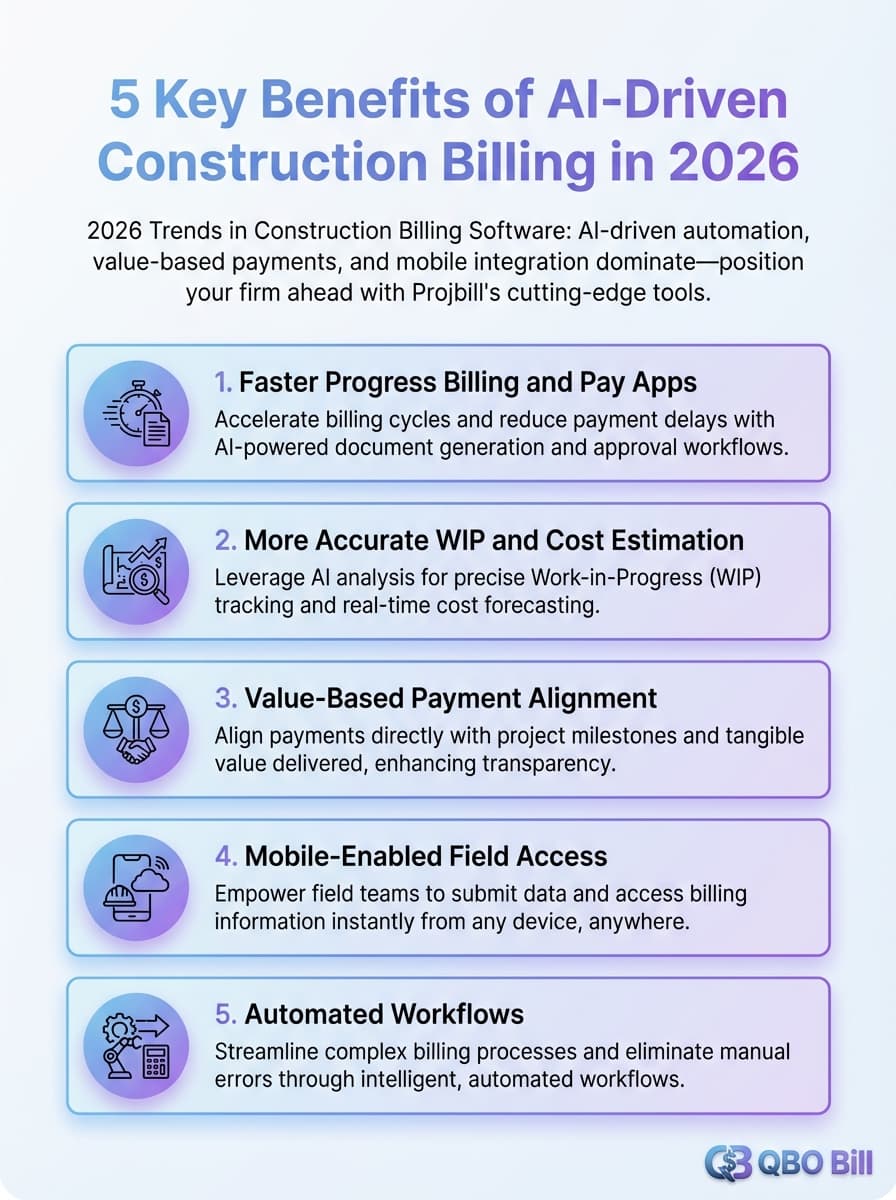
Nearly 18% of project time is currently lost just searching for data, which is exactly the kind of waste AI-driven construction billing software in 2026 is designed to eliminate. In this guide, we explain the key trends shaping construction billing, how they relate to value-based payments and mobile integration, and how ProjBill tools help your team stay ahead while working alongside QuickBooks projects and progress invoicing.
Key Takeaways
| Question | Answer |
|---|---|
| What are the biggest 2026 trends in construction billing software? | AI-driven automation, value-based and milestone billing, and mobile-first workflows dominate construction billing in 2026, supported by tools like our free Progress Billing Calculator. |
| How is AI changing construction billing workflows? | AI reduces manual data entry, predicts cash flow, and links field progress to billing schedules - similar to how our WIP Schedule Builder connects job progress and billings. |
| Why are value-based and milestone payments gaining ground? | Owners want to pay for outcomes instead of hours, so firms are shifting to progress, milestone, and phase billing structures, supported by tools like the Lump Sum Progress Billing Tracker. |
| How do mobile tools support faster pay apps and invoicing? | Mobile-friendly tools let field staff update percent complete, upload backup, and trigger billing events directly from the jobsite through cloud platforms similar to our online AIA G702/G703 Generator. |
| Where does ProjBill fit with QuickBooks projects and invoicing? | We provide construction billing calculators, WIP reports, and account structures that complement QuickBooks, including a QuickBooks Chart of Accounts Generator tailored to engineering and construction firms. |
| Are these tools affordable for small contractors? | All core tools highlighted here are currently $0 to use, so your team can modernize billing workflows without adding software cost. |
| Can AI help us price and manage labor more accurately? | Yes - start standardizing inputs with our free Labor Cost Estimator and Labor Margin Calculator. |
1. Why Construction Billing Will Look Very Different By 2026
Owners, GCs, and subcontractors are under pressure to bill faster, reduce disputes, and make cash flow more predictable. At the same time, regulations and client expectations push firms toward electronic invoices, detailed documentation, and outcome-based contracts. AI and automation sit at the center of this shift in 2026 because they connect project data, contracts, and billing rules in real time. Paired with mobile access, your billing system has to work where projects actually happen-not just in the back office.
2. AI-Driven Construction Billing Automation: From Data Entry To Decision Support
Billing is one of the highest-leverage places to apply automation because it's repeatable math driven by project data. In 2026, AI-assisted billing systems increasingly focus on interpreting contract terms, suggesting progress billings from field updates, and validating invoices against WIP status.
Using ProjBill's Progress Billing Calculator As A First Step
Our Progress Billing Calculator lets you enter contract value, previous billings, percent complete, and retainage to instantly calculate current amount due, retainage held, and remaining balance. This is the same structure AI billing engines rely on: standardized inputs that can be reused across projects. Shifting this work out of spreadsheets reduces errors, prevents disputes, and shortens the approval cycle.

3. Value-Based Payments, Milestones, And Phase Billing In 2026
Owners are moving away from simple time-and-materials and toward contracts that measure value delivered. That includes milestone payouts, phase-completion billing, and performance triggers tied to measurable outcomes. To keep up, billing systems must support granular breakdowns of the contract into milestones, phases, and schedule-of-values lines.
Milestone Billing With The Lump Sum Progress Billing Tracker
The Lump Sum Progress Billing Tracker lets you define milestones for a lump sum contract, track percent complete per milestone, and generate current billing amounts. Because it's $0 to use, smaller contractors can adopt milestone billing workflows without adding another software subscription.
Phase-Based Billing Allocation With Prior Vs Current Splitter
The Prior Billed vs Current Splitter focuses on splitting a billing target across project phases. Enter the contract amount, prior invoices, and the current billing target, and it allocates how much to bill per phase for the period. This phase-aware logic becomes essential as value-based billing and reporting requirements tighten.
Did You Know?
Forecasting cash flow and total project cost becomes dramatically more reliable when billing inputs and progress data are standardized across projects.
4. Mobile-First Billing Workflows And Real-Time Jobsite Data
In 2026, billing speed is increasingly tied to how quickly jobsite reality becomes structured billing inputs. When field staff can update progress from a phone-percent complete, backup documentation, and notes-billing can follow without waiting for manual consolidation.
Mobile-Friendly Pay Applications With AIA G702/G703 Generator
The AIA G702/G703 Pay Application Generator lets your team build AIA-style pay apps online, track prior billings, and export to PDF. Mobile-friendly pay apps reduce re-keying and let your billing staff focus on exceptions instead of repeated math.
5. Cash Flow Forecasting, WIP Control, And Over / Under Billing In 2026
Cash flow forecasting is moving out of isolated spreadsheets and into workflows that link contracts, field progress, and billing cycles. Over/under billing visibility (WIP control) becomes a portfolio-level management tool-not just a month-end exercise.
Using ProjBill's WIP Schedule Builder As A Foundation
Our WIP Schedule Builder helps you enter contract value, earned revenue, and billings to calculate over/under billing status, with export-ready outputs. Standardizing this structure now positions your team for faster reporting and fewer surprises.
6. E-Invoicing Mandates, Standardized Data, And Compliance Readiness
The trend line is clear: invoices are expected to be more structured, more exportable, and more consistently supported by documentation. ProjBill tools emphasize structured inputs and clean exports (CSV/PDF) so you can plug results into your accounting workflow and stay ready as requirements tighten.
7. Positioning Your Firm With AI-Friendly Estimates, Labor Planning, And Margins
AI is only as good as the inputs it receives, which is why standardized estimating and labor data become a competitive advantage. Firms that consistently map roles, hours, and billing structures can forecast cash flow more reliably and spot margin risk earlier.
Direct Labor Cost Estimator For Proposals
The Labor Cost Estimator lets you enter staff roles, hourly rates, and hours per task, then apply overhead and profit multipliers and export to PDF. Standardized fee build-ups reduce guesswork and improve repeatability across proposals.
Labor Margin Calculator For Role-Based Profitability
Our Labor Margin Calculator compares billing vs cost rates by role to estimate margins per role and across the team. This helps you tighten pricing and staffing decisions with actual numbers instead of instinct.
8. QuickBooks Projects & Progress Invoicing: How It Works Today And Where It Falls Short
Many construction and engineering firms rely on QuickBooks for accounting, including basic project tracking and progress invoicing. You can group transactions under a project and bill a percentage of an estimate over time. That works well for straightforward jobs, but the workflow starts to strain when you need detailed construction billing logic.
How QuickBooks Projects And Progress Invoicing Work
QuickBooks Projects helps you see profitability per job, while progress invoicing lets you invoice portions of an estimate across multiple billing events. It's a solid foundation, especially when you keep the billing structure consistent.
Limitations Of QuickBooks For Construction Billing
QuickBooks does not natively support detailed WIP over/under billing workflows, AIA-style pay apps, or more complex retainage and schedule-of-values processes without workarounds. As projects become more milestone-driven and value-based, these limitations become more visible-this is where ProjBill complements QuickBooks instead of replacing it.
9. How ProjBill Complements QuickBooks For 2026-Ready Billing
ProjBill is designed to sit alongside QuickBooks. Use QuickBooks for your general ledger and A/R, then use ProjBill tools for construction-specific billing logic: progress math, milestone tracking, pay apps, WIP structure, and export-ready documentation.
From ProjBill Outputs To QuickBooks Invoices
A common workflow is: calculate billing with ProjBill, export PDF/CSV for backup, then enter the final amount into a QuickBooks invoice or progress invoice. This keeps accounting clean while making construction billing faster and more defensible.
10. Building A Future-Proof Chart Of Accounts For Construction And Engineering
AI, value-based billing, and mobile data capture all benefit from a clean chart of accounts. Without a consistent account framework, it's hard to compare projects, analyze profitability, or feed clean data into forecasting workflows.
Using ProjBill's QuickBooks Chart Of Accounts Generator
The Chart of Accounts Generator helps you generate a recommended QuickBooks chart of accounts tailored to engineering and construction workflows, exportable to CSV. Adopting a better COA now makes WIP reporting, value-based billing, and forecasting dramatically easier.
Conclusion
By 2026, construction billing is defined by AI-driven automation, value-based payment structures, and mobile-first workflows that connect the field to the back office. QuickBooks projects and progress invoicing remain useful foundations, but construction teams increasingly need specialized tools to handle WIP, retainage, pay apps, milestones, and phase-based allocation cleanly. ProjBill provides those tools-free, browser-based, and built for the billing realities engineering and construction firms face every day.